Not-
Found
Showing posts with label Basics Hacking Tutorials. Show all posts

Top 10 Windows Built-In Command Line Tools

Top 10 Windows Built-In Command Line Tools

winlogo.jpgFor many Windows users, the thought of using the Command Prompt is either a scary experience or something that they will never need. But for some, the command prompt is a powerful tool that can be far more useful than many graphical tools available in Windows.

Being a System Administrator, I constantly use the command prompt, mostly because I access systems remotely and many tasks can be performed quickly with out the graphics over head (even though connecting via Terminal Server is very convenient).

So if you are an avid user of the command line, here are my top 10 built-in (non third party) command line tools for XP, Vista and WIndows server versions (remember these commands are not your typical tools, such as find, copy, move, dir, etc..).

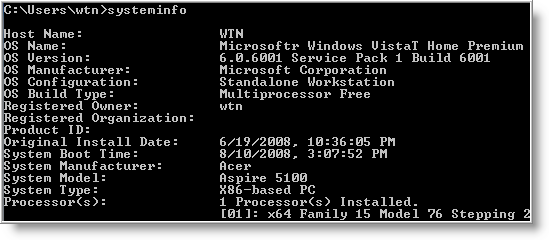
1 - systeminfo - Have a need to display operating system configuration information for a local or remote machine, including service pack levels? Then systeminfo is the tool to use. When I need to connect to a system that I am not familiar with, this is the first tool I run. The output of this command gives me all the info I need including: host name, OS type, version, product ID, install date, boot time and hardware info (processor and memory). Also knowing what hot fixes are installed can be a big help when troubleshooting problems. This tool can be used to connect to a machine remotely using the following syntax: SYSTEMINFO /S system /U user
2 - ipconfig - This tool may be most useful tool for viewing and troubleshooting TCP/IP problems. It's capability includes release or renew an adapter IP Address, display and flush DNS cache, re-register the system name in DNS. WIth Vista and some server versions, ipconfig includes support for IPv6.
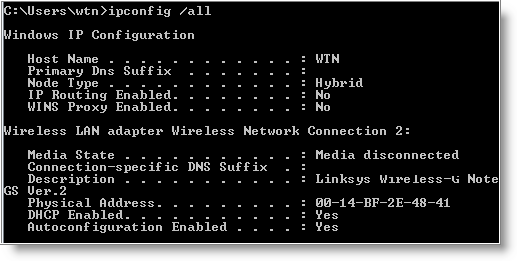
Some examples when usinging ipconfig.

  • To view all TCP/IP information, use: ipconfig /all
  • To view the local DNS cache, use: ipconfig /displaydns
  • To delete the contents in the local DNS cache, use: ipconfig /flushdns

3 - tasklist and taskkill - If you are used to Windows Task Manager, then you'll find tasklist very easy to use. This tool displays a list of currently running processes, including image name, PID (Process ID) and memory usage on local or remote machines. Using the /V switch displays more information in verbose mode that includes, CPU Time, user name, and modules. Tasklist includes a filter option to display a set of task based on the criteria specified. But the best use of the filter is using it to display programs running inside svchost.exe process.
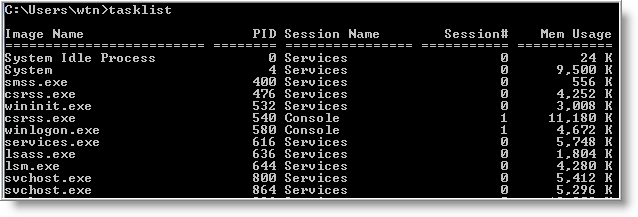
Of course, there will be times when a process needs to be killed and taskkill can be used to terminate those trouble processes. A single or multiple processes can be killed using the PID (/PID ) or image name (/IM ). Here are two examples for doing just that:

TASKKILL /IM notepad.exe
TASKKILL /PID 1230 /PID 1241 /PID 1253 /T

Both tasklist and taskkill can connect to remote systems using the /S (system name) /U (user name) switches.

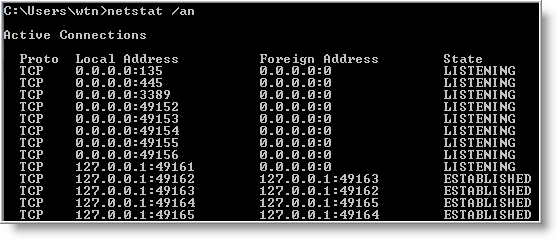
4 - netstat - Need to know who (or what) is making a connection to your computer? Then netstat is the tool you want to run. The output provides valuable information of all connections and listening ports, including the executable used in the connections. In additon to the above info, you can view Ethernet statistics, and resolve connecting host IP Addresses to a fully qualified domain name. I usually run the netstat command using the -a (displays all connection info), -n (sorts in numerical form) and -b (displays executable name) switches.
5 - type - A lesser known tool to those who don't work with the command prompt. For Administrators, the type command is the perfect tool for viewing text files. But what many people don't know about the type tool, is it's capability to read multiple files at once. For example to view multiple text files, just separate each file with a space:

type firstfile.txt secondfile.txt thirdfile.txt

For files that are large, you can control text scrolling using the more command.

6 - net command - Although this tool is more known as a command, the net command is really like a power drill with different bits and is used to update, fix, or view the network or network settings.

It is mostly used for viewing (only services that are started), stopping and starting services:

    • net stop server
    • net start server
    • net start (display running services)

and for connecting (mapping) and disconnecting with shared network drives:

    • net use m: \\myserver\sharename
    • net use m: \\myserver\sharename /delete

Other commands used with net command are, accounts (manage user accounts), net print (manage print jobs), and net share (manage shares).

Below are all the options that can be used with the net command.

[ ACCOUNTS | COMPUTER | CONFIG | CONTINUE | FILE | GROUP | HELP |HELPMSG | LOCALGROUP | PAUSE | PRINT | SESSION | SHARE | START |STATISTICS | STOP | TIME | USE | USER | VIEW ]

To display the complete syntax for each command, just type net help followed by the command - net help use .

7 - nslookup - With the Internet, DNS (Domain Name Service) is the key for allowing us to use friendly names when surfing the web instead of needing to remember IP Addresses. But when there are problems, nslookup can be a valuable tool for testing and troubleshooting DNS servers.

Nslookup can be run in two modes: interactive and noninteractive. Noninteractive mode is useful when only a single piece of data needs to be returned. For example, to resolve google.com:
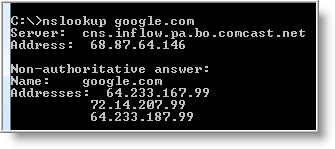
To use the interactive mode, just type nslookup at the prompt. To see all available options, type help while in interactive mode.
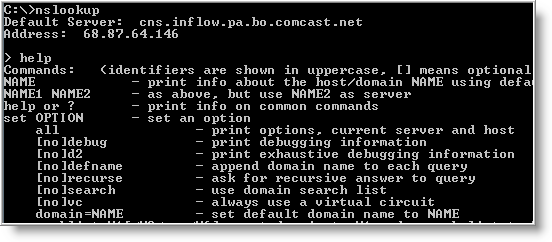
Don't let the help results intimidate you. Nslookup is easy to use. Some of the options I use when troubleshooting are:

set ds (displays detailed debugging information of behind the scenes communication when resolving an host or IP Address).

set domain (sets the default domain to use when resolving, so you don't need to type the fully qualified name each time).

set type (sets the query record type that will be returned, such as A, MX, NS)

server NAME (allows you to point nslookup to use other DNS servers than what is configured on your computer)

To exit out of interactive mode, type exit .

8 - ping and tracert - These tools can be helpful with connectivity to other systems. Ping will test whether a particular host is reachable across an IP network, while tracert (traceroute) is used to determine the route taken by packets across an IP network.

To ping a system just type at the prompt: ping www.google.com. By default, ping will send three ICMP request to the host and listen for ICMP “echo response” replies. Ping also includes switches to control the number of echo requests to send (-n ), and to resolve IP addresses to hostname (-a ).

To use tracert, type at the prompt: tracert www.google.com. You can force tracert to not resolve address to hostnames by using the -d switch, or set the desired timeout (milliseconds) for each reply using -w switch.

9 - gpresult - Used mostly in environments that implement group poicies, gpresults (Group Policy Results) verifies all policy settings in effect for a specific user or computer. The command is simple to use, just enter gpresults at the prompt. It can also be used to connect to computers remotely using the /S and /U switches.

10 - netsh - Without a doubt the most powerful command line tool available in Windows. Netsh is like the swiss army knife for configuring and monitoring Windows computers from the command prompt. It capabilities include:

  • Configure interfaces
  • Configure routing protocols
  • Configure filters
  • Configure routes
  • Configure remote access behavior for Windows-based remote access routers that are running the Routing and Remote Access Server (RRAS) Service
  • Display the configuration of a currently running router on any computer

Some examples of what you can do with netsh:

  • Enable or disable Windows firewall:

netsh firewall set opmode disable

netsh firewall set opmode disable

  • Enable or disable ICMP Echo Request (for pinging) in Windows firewall:

netsh firewall set icmpsetting 8 enable

netsh firewall set icmpsetting 8 disable

  • Configure your NIC to automatically obtain an IP address from a DHCP server:

netsh interface ip set address "Local Area Connection" dhcp

(For the above command, if your NIC is named something else, use netsh interface ip show config and replace the name at Local Area Connection).

As you can see netsh can do alot. Instead of re-inventing the wheel, check out the following Microsoft article for more info on netsh.

The use of Windows command line tools can be a powerful alternative when only a command prompt is available. I'm sure there are plenty more commands that I have not mention.

Let us know what your favorite command line tool is and leave a comment below.

COURTESY - www.watchingthenet.com

Posted by
Jaswinder Kaur

More

Top 10 open source Windows apps

Top 10 open source Windows apps

Geek to Live: Top 10 open source Windows apps

Companies like Google and Microsoft give away free software as a courtesy to their users to hook more people on their services ("free as in beer.") But open source organizations are often non-profit and made up of volunteer developers who release free software because they believe users have a right to control their data ("free as in speech.")

Open source roots are in the Unix operating system, but these days many "free as in speech" applications are available for Windows as well - and today I've got a list of my top 10 favorites.

None of these cost a dime to download and use, but do donate whatever and whenever you can to the projects that benefit you the most.

1. Mozilla Firefox (Web browser)

Crikey, another Firefox plug! Yeah, we love the 'fox, and we'll keep talking about it until EVERY SINGLE ONE OF YOU USES IT. It really just doesn't get any better when it comes to a cross-platform, open source web browser.

2. Mozilla Thunderbird (Email client)

Firefox's much less celebrated little brother is one helluva email client. We especially like its customizable message filters, built-in adaptive Junk mail filter and ability to install useful add-ons (like Firefox).

3. Open Office (Office suite)

Used to be that anyone who wanted to open a Word document had to drop a few Benjamins on Microsoft Office or risk pirating it. No more - Open Office is a free alternative to M$ Office for students, freelancers and poor people just wanting to save their spreadsheet as an .xls.

4. Gaim (Instant messenger)

Chat on any service you'd like - AIM, Yahoo! Messenger, MSN, Jabber, ICQ - with this multi-platform, tabbed IM client.

5. ClamWin (Antivirus)

Norton bugging you again to break out the credit card and subscribe? Uninstall! ClamWin is free anti-virus software with automatic updates and scheduled scans, no credit card required.

6. VLC Media Player (Audio/video player)

Got a video or audio file Windows Media Player or Quicktime can't play? Betcha VLC can.

7. KeePass (Password manager)

Another app you really don't hear a lot about, but for anyone with more than 6 different passwords, KeePass is indispensable. Check out my previous feature, Securely track your passwords for more on using KeePass.

8. Cygwin (Unix command line emulator)

That DOS command line just doesn't cut it. Wanna turn into a CLI ninja on your PC? You need Cygwin.

9. Eraser (Data deletion utility)

Before you donate, sell or trash your hard drive, you want to make sure there are no traces of your naughty private data on it. Eraser uses the same algorithm the government uses to wipe your hard drive clean.

10. TrueCrypt (File encryption utility)

You've got a folder full of files you don't want anyone to access but you. Lock it (or an entire thumb drive) up with the free TrueCrypt software.

Author - Gina Trapani

Courtesy - LIFEHACKER

Posted by
Jaswinder Kaur

More

Ulitmate Bit Torrent Guide (Links and pics)

Tired of Slow torrent speeds ? here is the ultimate torrent guide for Newbie’s and Experts alike.
Hope you like and enjoy this guide, Heres the contents :-
Choosing your client
  1. The best sites I have come across
  2. Opening your ports
  3. Checking to see if the ports are open
  4. Spyware + Adware Section
  5. Antivirus section
  6. Connecting to your tracker
  7. Common Tracker Errors
  8. Opening the downloaded torrent
  9. Firefox Plugins
  10. Messages to Torrent Newbies
  11. lvlord patch
  12. Locating your I.P Address
  13. My success!!!

[1].CHOOSING YOUR CLIENT
I have been through alot of different clients. The best I've found is Bitlord v1.1 thats were i hit all my 100KB/s+ torrents,
You can find this at http://www.bitlord.com/.
The second best one in my opinion is Azureus, this is very user friendly, especially with all the plugins. Located at http://azureus.sourceforge.net/
Another useful client is Bittornado, Latest version is 0.3.12 and its homepage is http://bittornado.com/
I've also tried G3 Torrent, and I have to say i liked its interface.Can be found at http://g3torrent.sourceforge.net/ i believe the newest version is 1.01
ABC (Yet Another Bittorrent Client), ABC is an improved client for the Bittorrent peer-to-peer file transfering, It can be downloaded from http://pingpong-abc.sourceforge.net/ 2.6.1 is the newest available version i think.
Bitcomet is used by alot of people here at AD, It's homepage is http://www.bitcomet.com/
DVDBack23 has produced a guide for this client http://forums.afterdawn.com/thread_view.cfm/234097
The penultimate one I will mention is Artic torrent, as this is what i would reccommend if your computer is quite low end, because it doesn't use alot of your CPU up. this one is at http://www.int64.org/arctic.html
Exeem is a brand new Peer To Peer program, SPYWARE and ADWARE free which is good news,
Can be downlaoded at http://www.exeem.com/ lastest release 0.27


[2].THE BEST SITES I HAVE COME ACROSS
http://www.bitsoup.org - you have to register but it's still free
http://www.bitenova.org
http://www.torrentreactor.to
http://www.piratebay.org
http://www.torrentspy.com
http://www.btjunkie.org
http://www.litebay.org
http://www.bi-torrent.com
http://www.bittorentportal.com
http://www.mininova.org
http://www.araiditracker.com
http://www.torrentbytes.net/
http://www.filelist.org
http://www.torrentpimps.com
http://www.empornium.us
http://www.torrentit.com
http://seedler.org/en/
http://www.torrenttyphoon.com - Very nice torrent Search Engine
http://www.torrentz.com - Great Search Engine
and some more can be found here
http://forums.afterdawn.com/thread_view.cfm/1/174585#1261180
The best Public sites i have found to date are with descriptions
http://www.isohunt.com/ - Excellent torrent Search.
http://www.torrentspy.com/ - Excellent search engine for torrents, incredible variety
http://www.torrentreactor.to/ - Well Organized, maintained Large Selection
http://mininova.org/ Large Selection of torrents, updated daily.
http://www.litebay.org/ - Good site
http://www.livetorrents.com/ - Good allrounder offering games, movies...
http://www.hypertorrent.com/ - Decent Search enginge for Torrents
http://www.torrentportal.com/ - Another good site
All rounder sites
More sites that aren't bad
Novatina.com Tv, movies, games, music, apps, anime, dvdr, more
Link: http://www.novatina.com/
Booga.org(meganova) Tv ..............
Link: http://www.meganova.org/
Torrent Valley Tv ..............
Link: http://www.torrentvalley.com/
Potuk(Pirates of the UK)
Link: http://www.potuk.com/forum/
Torrent Addiction
Link: http://www.torrent-addiction.com/
Piratic
Link: http://piratic.org/
AND the new litebay.org
Link: http://www.litebay.org/
Anime Sites
I know of a few decent anime sites, i don't really like anime but someone might benefit from these sites
Animelab.com - Alot of anime
Link: http://www.animelab.com/anime.manga/bittorrent/
AnimeIndex - More anime
Link: http://www.animeindex.net/
Animesuki.com - It's fairly good from what i can see
Link: http://www.animesuki.com/
BoxTorrents - Packed with Anime
Link: http://www.boxtorrents.com/browse.php

Give it a try aswell as some of the other sites :P

[3].OPENING YOUR PORTS TO GET OPTIMAL SPEEDS
HOW TO OPEN YOUR PORTS
http://www.portforward.com - Print off all the instructions that gives you.
For e.g I have a Netgear router so i type 192.168.0.1 into my broswer(Mozilla FireFox). Then type in 'admin' and 'password' in the two available spaces. I followed the intrustion on default portforwarding for the Netgear DG834, and followed them instructions using my listening port 65535.
Also on Port Forwarding if anyones struggling if you need to access your router config..
http://192.168.1.1/ (Asus, Draytek, Linksys, Zyxel, Cisco,WooWeb-Pro)
http://192.168.2.1/ (Belkin,SMC (some browsers need :88 added))
http://192.168.0.1/ (DLink, NetGear,Nexland)
And then visit Portforward. this is a great site for instructions with pictures: http://portforward.com/routers.htm Also, most manufacturers post their manuals online.
You need to forward your ports if you have NAT in order to get optimal speeds. This is one of the most common issues, people fail to configure when they use BitTorrent.
BitTorrent default ports are ports in the range of 6881-6999.
When opening ports here are some commmon ports that may want to open, if you want to get optimal speeds
Client Port
TCP, UDP
Azureus: 6881
BitComet: 12242
BitTornado: 10000-10004, 10000-10004
BitTorrent: 6881-6889
ABC: 6881-6999
Shareaza: 6346, 6346
Bitlord: RANDOM PORTS
I'll also add some general P2P Ports,Bear in mind these have nothing to do with Bittorrent just Filesharing
Limewire: 6346 6346
Gnutella: 6346 6346
eMule: 4662-4711, 4672
eDonkey: 4662, 5737
BearShare: 6346
Only open the ports you need to open!
Also your ISP may not allow opening some of these ports so you have to choose a random one instead bear in mind this cannot be done with all file sharing apps
Ports for Bitlord -
I use 65535, To use that port go to Options > Prefrences > Then type in 65535 in the listening port. Then set your global max upload rate to 20KB/s rather than No Limit. You have to configure your router to open the ports go onto your routers site (192.168....) I have a list off all of them above. Then go to http://www.portforward.com, And choose the default guide for your router

[4].CHECKING TO SEE IF THE PORTS ARE OPEN
When opening ports and you need to know if they were open,
So run a few tests ..............
1) go to Shields Up!!
http://grc.com/x/ne.dll?bh0bkyd2
2)Then click proceed
3)
4)Hopefully you will see this

Next you could run a NAT check http://btfaq.com/natcheck.pl
Type in your port number 65535 in my case
And hash of the torrent you need that, you can get it from the torrent site you get it from e.g go back to place you got the link from.
Hopefully you will get pass! If everthing is as i have told you have forwarded your ports correctly

[5].ADWARE + SPYWARE SECTION
when downloading Torrents you need to be careful, so I'll post a list of good Spyware/Adware Removers out there the majority of files are geuine but some are Viruses, Trogans, Keylogging Tools.....etc
I'll begin with one of the best, Ad-Aware SE Personal, it's a very nice tool
Description at http://www.lavasoftusa.com/software/adaware/
Download at http://www.download.com/Ad-Aware-SE-Personal-Edition/3000-8022_4-...

Next is my favourite Spybot S&D, IMO it's the best and it's free!
Description at http://www.safer-networking.org/en/index.html
Download at http://www.safer-networking.org/en/download/index.html

Microsoft Windows Antispyware (Beta version) this will help protect your comp from spyware
Description at http://www.microsoft.com/athome/security/spyware/software/default.mspx
Download at http://www.microsoft.com/downloads/details.aspx?FamilyId=321CD7A2...
(You must have a genuine copy of Windows to get this)

Another good one is SpywareBlaster v3.4, It's freeware!!
Description at http://www.javacoolsoftware.com/spywareblaster.html
Download at http://www.download.com/SpywareBlaster/3000-8022-10196637.html?pa...

Webroot offers a good range, In particular SpySweeper although it costs theres a free trial
Description/Download http://www.webroot.com/consumer/downloads/?WRSID=0bedb3f5d72f3862...

Anotherone I found is Spyware Doctor™ 3.2, seems to be ok(an award winning spyware remover)
Description at http://www.pctools.com/spyware-doctor/
Download at http://www.pctools.com/spyware-doctor/download/

eTrust PestPatrol is another great tool, it's one of the best I've found
Description/Download free trial at http://store.ca.com/v2.0-img/operations/ca/site/pestpatrol/pp4.htm

*****Trend Micro Free online virus scan*****
http://housecall.trendmicro.com/
Also on the trend micro note try their free trial
Download at http://uk.trendmicro-europe.com/enterprise/downloads/choose-reaso...

Last one now BPS AntiSpyware remover, heard good things about it
Description at http://antispyware.bulletproofsoft.com/
Download at http://www.softpedia.com/get/Internet/Popup-Ad-Spyware-Blockers/B...
Antispyware software is very important as some people upload fake torrents which are essentially viruses, It will also stop hackers

[6].ANTIVIRUS SECTION
Also get some form of antivirus software -
The best IMO Norton Antivirus or Internet security 2005 - Description at http://www.symantecstore.com/

[7].CONNECTING TO YOUR TRACKER
Also a reason for bad speeds is because your not connecting to your tracker properly heres a diagram i made, Please note: this is only for bitlord v1.1 it may be different on your client.


[8].COMMON TRACKER ERRORS
Some of common errors people get from the Trackers
error 10061 problem connecting to tracker - This means that you cannot for whatever reason establish a connection to the tracker needed to download a file. This is commonly caused by routers, trackers being too busy, or your net connection going down.
My download just sits at the “connecting to peers" status
This means there are no peers to connect to, or your firewall/router is preventing a connection.
error 10060 Connection timed out - this means that you sent a request to a peer or tracker, and there was no response. Again this error generally sorts itself out given time, and can be caused by a busy tracker. If it doesn't carry on after a bit double check the torrent is seeded and the tracker is working
Problem connecting to tracker - <urlopen error (111, 'Connection refused')> - Just let the torrent run in your client and the client will keep checking the tracker and should resume eventually.
I got stuck at 99% with several seeders - Try stopping the torrent and restarting from tracker :) that should work

9.)OPENING THE DOWNLOADED TORRENT
Mainly i download files that are .rar so i open and extract them using WinRAR, that supports RAR, ZIP, CAB, ARJ files.
If you download a .ISO .cue .pdi .ccd or .mds file use Alcohol 120%( http://www.alcohol-soft.com/ ) or Daemon Tools to mount it or burn them using Nero. (If it is a DVD ISO you could use DVD Decrypter)
Examples
Familyguy.rar - You open with WinRAR, Use this to extract then you might get any video format, .avi or .vobs or something like them
Familyguy.iso - You can check the quality by using VLC Media Player by VideoLAN Team, Then if your happy with the quality burn with Decyrpter it ISO Write mode

[10].FIREFOX PLUGINS
Another handy thing i would like to add is Mozilla FireFox plugins, I have the Torrentspy, BiteNova and the Torrenttyphoon Plugin. Excellent 'lazy' feature that saves alot of typing although i don't use public trackers as much i ust to their still very handy when my U/D ratio is getting abit out of control or if it's a torrent i don't mind waiting for.
If you dont have firefox get it here http://www.mozilla.org/products/firefox/ It's the perfect browser for torrents especially with all the plugins and Bookmarked torrent sites.
All those intending to get Firefox look at Geestars pipelining thread OMG that increases the speed of loading pages considerably, which is handy when browsing while downloading Torrents
http://www.torrenttyphoon.com


[11].MESSAGES TO TORRENT NEWBIES
**I would reccomend changing your max upload to 20 when downloading!!**
at the start i couldn't get out of the 20s I have now improved things by 100KB/s.
Try to download your torrents one at a time. DO NOT RUSH
always download torrents when their at their healthiest
Don't expect miracles when the torrent has few seeders.
Once youve opened your ports,
Speed is ultimately down to the number of seeders and peers
Then its down to your internet connection (dial up,1mb,2mb....)
Don't be discouraged when your in high 20s low 30s and have 10 seeders or less thats normal! its very rare that I get above 50KB/s with less than 10 seeders.

[12].LVLORD PATCH
Once youve opened your ports, Speed is ultimately down to the number of seeders and peers
Then its down to your internet connection (dial up,1mb,2mb....)
Don't be discouraged when your in high 20s low 30s and have 10 seeders or less thats normal! its very rare that I get above 50KB/s with less than 10 seeders.
what does it do
SP2 limits the number of simultaneous incomplete outbound TCP connection attempts. The Lvlord patch fixes that and then you can make as many as you want it usually works best for P2P apps like Limewire and IM-L Peanuts, but I've found it works on Torrent clients aswell

[13].LOCATING YOUR I.P ADDRESS
If you need to locate your I.P Address for whatever reason heres how


[14].MY SUCCESS


I did some research into the speeds 1mb Broadband should give....
Limewire Pro 4.9.23

IM-L 5

So on almost every client i was downloading at about 110KB/s-115KB/s,
Until recently i couldn't top 115KB/s until a couple of days ago when I maxed out at 132KB/s on a single Download, It can be done

A Guide By J-Kwon . posted by XERO
Source

Posted by
Jaswinder Kaur

More

TOP 7 Must Read Articles at PROHACK – 2009 Reviewed

As 2009 goes away, its time to review what I did on PROHACK..and share the best of stuff with you folks again. I believeProhack - Your technology Navigator  these articles are a must read if you have been a regular here,and double if you are not. Prohack has gotten better with you guys and it was not possible without you..SO..Here are the Top 7 Must read articles at PROHACK -
Create a Zip Bomb of Deathuntitleddsa[13]
A zip bomb is usually a small file (up to a few hundred kilobytes) for ease of transport and to avoid suspicion. However, when the file is unpacked its contents are more than the system can handle.You can make your own zip bomb to annoy your friends or just out of curiosity (or wilderness) to experiment with it. Make sure you don't detonate it on yourself.
How to Hack Administrator from Guest Account Hack admin account from guest account
Ever wanted to hack your college pc with guest account/student account so that you can download with full speed there ? or just wanted to hack your friend’s pc to make him gawk when you tell your success story of hacking ? well,there is a great way of hacking an administrator account from a guest account by which you can reset the  administrator password and getting all the privileges an administrator enjoys on windows..Interested ?
Hack PHP 4.4 websites in 20 seconds Hack PHP 4.4 sites in 20 seconds
Actually sites with PHP 4.4 have a SQL injection vulnerability in them which makes their Admin control panel easily accessible,and I mean in one big shot,you will be admin of that site.
Top 10 Tips to optimize your website Top 10 web seo tips
Making a website is easy,but making it survive through the Wild Wild Web is quite a formidable task. I have seen many potential websites crumble and vanish through the web in a short span of time,and today I will be sharing my knowledge with you. I have followed the 10 simple rules which have allowed me to get the love of my readers in such a short time and have made ProHack more than a name in the web..Read them and follow them.
Top 10 Anticipated games of 2009Top 10 anticipated games of 2009
2009 proved to be a great year for gaming and the developers wants to keep the roller coaster ride of top releases keep going with extremely hyped games by the top dogs of gaming. The list is compiled on the factors on how much is known about the game,how incredible it looks the current user reviews,and the following big boys made it on the top 10 most anticipated games of 2009.
Hack LG KG195 for Increased Feature Hack LG KG 195
I used to have an LG KG195,an average mobile by LG electronics. A modest mobile with modest features,it has got Bluetooth, a basic media player and a VGA camera. However I soon got bored of this set and decided to tweak it to make it a more desirable device.Learn how to hack LG devices..
Top 10 LINUX speed hacksTop 10 Linux Speed hacks
As an extremely reliable Operating system, Linux  rarely needs to be rebooted. But when it does, it’s often slow to boot.Loads of Matrix style lines scrolling down the screen are sure to drive nuts added with boot time of GUI  initialization.. Fortunately, there are ways to speed things up. Some of these methods are not terribly difficult. (although some, unfortunately, are). Let’s take a look at Top 10 Speed hacks of Linux and let your linux box reincarnate with speed. 
Bonus -
Resident Evil 5 – An Honest ReviewRE5 - an Honest Review
Resident Evil 5 was one of the most hyped games of this generation and was prominently featured in various Top 10  Lists. The incredible amount of hype it generated was contributed to the long development period,the over the top gorgeous looking trailers,gory in game footage and just the plain curiosity,whether it will be able to surpass its legendary predecessor or not..
5 Type Of Virus Writers 5 Type of virus writers
Whilst stumbling on the net,I found this humorous description of 5 types of virus writers written by an actual hacker.I really loved the overall tone of the article and thought its worthy to share it with you guys..Enjoy.

Happy new year..

PS : Like this tutorial ? You can always support me by buying me a coffee or You can always try some of the cool merchandize from PROHACK.

Posted by XERO. All Rights Reserved.

Posted by
Jaswinder Kaur

More
Powered by Blogger.

Copyright © / Jaswinder Kaur

Template by : Urang-kurai / powered by :blogger