Google SERPS - Mystery search algorithm gets Speed criteria

Google has announced that it will be adding the site speed or loading time of a website as a criteria for its Site speed as a new criteria ? - www.theprohack.comsearch rankings. this was indicated in Google’s last post in December and now its been formally announced by Amit Singhal, and Matt Cutts – Google's principal search quality team. Site speed as a new parameter reflects “how quickly a site responds to web requests" . This change is has been adopted to make this world a happier place

"Speeding up websites is important — not just to site owners, but to all Internet users. Faster sites create happy users and we've seen in our internal studies that when a site responds slowly, visitors spend less time there,"

Faster websites reduce operating costs, improve user experience and overall make internet a more habitable place. But as there are always two faces of a coin,some webmasters are just not finding site speed a solid idea. What about websites that have advertisements ? they will obviously load slower than websites with no advertisements and with plain html. What about websites with flash content ? Worse even,the Google Adsense and Google Adwords code is known to slow a website. Would that ultimately affect a website’s rankings ?

Google's New Search algorithm - www.theprohack.com

Google has provided a list of free tools to measure speed of a website. Tools like Google Pagespeed,Yahoo’s Yslow are provided to measure website’s speed. Google might use Google toolbar to measure website speed, but is it a reliable measure ? Further, the Google duo commented

“While site speed is a new signal, it doesn't carry as much weight as the relevance of a page. Currently, fewer than 1% of search queries are affected by the site speed signal in our implementation and the signal for site speed only applies for visitors searching in English on Google.com at this point. We launched this change a few weeks back after rigorous testing. If you haven't seen much change to your site rankings, then this site speed change possibly did not impact your site.”

Ah well…if this is true, then the current web design as we know it;is dead. Whatever the bets, a new competition of speed is being heralded in coming days.

In the mean time, you can check out the pagespeed addon from here

Google

Posted by
Jaswinder Kaur

More

Google Search Engine most confusing Boolean operator is OR

The OR operator, represented by the pipe symbol ( | ) or simply the word OR in uppercase letters, instructs Google to locate either one term or another in a query. Although this seems fairly straightforward when considering a simple query such as hacker or “evil cybercriminal,” things can get terribly confusing when you string together a bunch of ANDs and ORs and NOTs.

Let’s take a look at a very complex example.

intext:password | passcode intext:username | userid | user filetype:csv

This example uses advanced operators combined with the OR Boolean to create a query that reads like a sentence written as a polite request.The request asked of Google would read, “Locate all pages that have either password or passcode in the text of the document. From those pages, show me only the pages that contain either the words username, userid, or user in the text of the document. From those pages, only show me documents that are CSV files.” Google doesn’t get confused by the fact that technically those OR symbols break up the query into all sorts of possible interpretations. Google isn’t bothered by the fact that from an algebraic standpoint, your query is syntactically wrong. For the purposes of learning how to create queries, all we need to remember is that Google read our query from left to right.

The previous query can also be submitted as

intext:(password | passcode) intext:(username | userid | user) filetype:csv

This query is infinitely more readable for us humans.

Posted by
Jaswinder Kaur

More

How To Get Free Backlinks from EDU and GOV sites

In the cyber world, reputation of EDU and GOV domains are quite good and so the backlinks also worth a lot. To get a backlink from such domains are more valuable as compare to any other domain. To get free backlinks the first step is to find blogs and forums on edu or gov sites.

To find an edu blog, search the below team in Google:

site:.edu inurl:blog "post a comment

To find an gov blog, search the below team in Google:

site:.gov inurl:blog "post a comment

To find an edu forum, search the below team in Google:

site:.edu inurl:forum "post a comment

To find an gov forum, search the below team in Google:

site:.gov inurl:forum "post a comment

Now the next step is to get a backlinks. For this all you have to do is post a comment on the blog and forum. This is quite tricky part as you have to be careful before posting you comments. Be sure to post only relevant comments only. DON"T try to spam otherwise your comments will be deleted without any delay. EDU and GOV domains are quite strict towards spamming. Only leave QUALITY comments related to the post.

Show you respect for blog owner and leave sincere comments. It actually adds value. This is a WIN-WIN situation as you will add contents to their blog and in return you will get a free backlink from a reputed website.

Posted by
Jaswinder Kaur

More

Improve Google Page Rank and Alexa Ranking

Showing up on search engines is one of the most critical ways to increase website traffic and expose your content, improve search engine rankings product or service to people who might be interested in what you have to offer. Most of the major search engines utilize an algorithm to determine where a website ranks.Google uses Pagerank system and Alexa uses various criteria’s to rank your position in related searches.A proven but little-known way to improve your page rank with Google and your Alexa ranking for new web authors is here for you.

Steps

  1. Build a website. NVU is an easy free WYSIWYG html editor or use a simple blogging platform like blogger,typepad or wordpress.
  2. Make sure that your site is optimized for the search engines and that all meta tags and robot tags are constructed properly.
  3. Focus building your site on original and unique content. Once Internet users start to appreciate and see the value in your website, they will begin linking to it.
  4. Submit your site map to Google to have all of your pages indexed.
  5. Submit to the main search engines, Yahoo, Google, MSN and any others that you prefer.
  6. Go to your favorite search engines and type in "social bookmark sites".
  7. Submit your site and any other favorite sites to as many social bookmark sites that you like.
  8. Submit your site to as many directories as you can, specially to those with high page rank like DMOZ or yahoo directory or to any smaller directory with lower page rank.
  9. Update your site frequently adding new content that keeps users returning to your site.

This method is two-pronged because not only will you get better positions in searches for your keywords, you are also going to receive one way inbound links for your website which will improve your search engine rankings.Add your website address sparingly to social bookmarking and wiki sites. Users who over-indulge in self-promotion will be perceived as spammers which may result in your website being added to blacklists or, even worse, your efforts to be simply ignored.Beware of duplicate content. Always make sure to check the content that you get by searching for the content on Google, Yahoo, and MSN.Be original and blog original. And just in case if you are copying from other blogs or websites,then do give a reference or link to the original source.

Good luck and

Posted by
Jaswinder Kaur

More

How to Improve Search Engine Ranking

How to Improve Search Engine Ranking

Showing up on search engines is one of the most critical ways to increase website traffic and expose your content, product or service to people who might be interested in what you have to offer. Most of the major search engines utilize an algorithm to determine where a website ranks. The search engines have set up specific criteria that a website must meet to get to the top of the list. The criteria are different for every engine, but all engines share several commonalities. It all boils down to the type and amount of content provided on a given website, the level of optimization done on the site, and the popularity of the website (link popularity/PageRank). Tailoring your website for improved search engine rankings is also known widely as search engine optimization, or SEO.

Steps

[1]. Research the keywords:Decide what search queries you want to show up for. Do some research on how many people are actually searching for your site. Many times it is best to consult a "natural search engine optimization" professional during this process. There are several tools available from Google, Overture, and third party software developers that can make the keyword research process easier.
[2]. Think outside of the box: Don't just focus on your main keywords. The first thing to realize when targeting keywords is that it is not all about ranking for the most popular keyword. The most successful search engine marketing and optimization campaigns target the most relevant keywords. For example, if you are a realtor in a particular area, don’t just optimize your site for “real estate." Optimize your site for dentist, florist, movie theaters, etc. You would be amazed how many unique visitors will come through to your site when "outside of the box" thinking occurs.
[3]. Focus on the end user: If you spend too much time trying to please the Search Engine Spiders, you may forget about the end user. Think about what your target market needs to accomplish their goals, and then put it on your site so that they can find it. The phrase "content is king" was born about 6 years ago, and it still holds true today. If you want to be relevant for specific keywords, than you need superior or at least highly competitive content. Write about 225-300 words of copy for each keyword and plant it on your site each day. Grow, grow, and grow. On average, one can target between 3-5 like keyword phrases per page. Make it as natural as possible and the Search Engines will reward you will a first page ranking.
[4]. Describe EVERYTHING: Make sure that all the pages of the site of have custom titles and descriptions. If your site is using the same tags for all the pages, you are not helping search engines figure out the subject or relevance of your individual pages. Regarding Meta Tags, there are 2 very important fields:
* Title Tag - arguably the most important SEO tag for any website. Google supports approx. 60 characters in the title, while Yahoo allows for up to 110 characters in the title. It is important to target the most critical keywords in the Title. Every page should have a unique Title.
* META Description Tag - also very important for every page on the site. Some engines do display the description defined, while others do not. All search engines do read the description tag, and do utilize the content found within in the ranking process. A good rule of thumb is to create descriptions that do not exceed 200-250 characters. The META keyword Tag is essentially useless in today's SEO market, but is often times good to utilize as a placeholder for the keywords targeted.
[5].Maintain Consistency: Keep the structure, navigation and URL structure of your site simple enough for search engines to follow. Remember that search engines cannot parse your navigation if it's using flash or javascript. So try to stay close to standard HTML when it comes to Navigation. URLs with dynamic parameters (?, &, SIDs) usually do not perform when it comes to search engine rankings
[6]. Create a site map: Create a site map that tells people where everything is on your site. You will get about a 1% click through rate to your site map. However, it will do wonders for those who know what site maps do, and the Search Engines will like it as well.
[7]. Build up your popularity: So now you have determined the right keywords on the right pages, you've created all of the necessary content; you've optimized all of the content to the best of your capabilities. Congratulations - you're now in the top 80 percentile (from an optimization standpoint) of the websites listed for the keywords you're trying to target. So how do you get a 1st, 2nd, or 3rd page listing? The answer is quite simple: You have to be the most popular, too. That's right, it's a popularity contest. In other words, how many other websites know you (link to you), and how popular are they? This is typically referred to as link popularity, or called PageRank by Google. The more sites that link to your site the better, and the more popular the site linking to you the more value you will receive for your link popularity. The best types of "link building" are directory registration, text link advertising, and press release distribution. Try to offer valuable information or tools so that other people are motivated to link to your site. Well linked sites (that don't use spamming) do better in search engines.

Tips

* Search engine algorithms assess the relevance of your page to any particular keyword by the content on your pages. For instance if you are selling "widgety widgets" on your site and you do not mention "widgety widgets" on your page text, search engines have very little to work with. Also make sure that you are not spamming search engines by using the same keyword over and over.
* Although not as important as they used to be, reciprocal links do still matter with Google. Reciprocate with similar websites and include keywords near the links on your site.
* If you want to optimize well for your city, state etc., make sure to sprinkle geographic search terms throughout. Include it in text as well as set apart. Search engines do not know where you are unless you tell them.
* Bold and italics can make your keywords stand out more with the search engines.
* Interior links within your site will improve SEO; Sitemaps are a great way to generate internal links and make your website better too!
* Correct broken links, search engines do not like dead ends.
* If you have over 30 keywords that mean business to you, then you might want to hire a Professional Search Engine Copywriting firm or outsource it to freelancers.
* Anyone who can go to google and type in "keyword research" will find very many tools that mixed with common sense should suffice quite well.
* Now when digging deeper to understand the traffic patterns of certain keywords use Wordtracker’s GTrends Tool. You can get an idea on the amount of competition on Google compared to the amount of searches. Now these numbers are far from accurate, BUT if you can kind of step back and take a broader look at things, don’t worry so much about the numbers but compare the trends since it shows the past history. See if its steady traffic, traffic that is going extinct, or traffic just starting to peak. By using this tool, you can many times find some golden opportunities.
* It really comes down to just using common sense. Just sit down and think, "What would other people search to find this? What would I search for to find this?" Try phrases in your keyword research tool to get new ideas and find the higher trafficked most targeted phrases. DO NOT look at the numbers spat back out at you by these programs as accurate numbers, they rarely are. You can still use these tools to get ideas on new keywords, search patterns of users, and many other things, that mixed with the information of trends in that area, can really help you.

Warnings

* If you are going to use freelancers, beware of duplicate content. Always make sure to check the content that you get by searching for the content on Google, Yahoo, and MSN.
* Never have hyperlinks like "click here", hyperlinks should always be keywords, long hyperlinks with multiple keywords are even better.
* Don't hide content.
* Don't create duplicate websites.
* Remember that if you use black-hat SEO techniques, you run the risk of getting penalized by the search engines and having your web site permanently removed from their index.

Posted by
Jaswinder Kaur

More

How to access blocked websites and How to protect your privacy online using Hotspot Shield

Hotspot Shield is a freeware which ensures anonymous and censor-free internet usage. With Hotspot Shield you can even access blocked websites. For example: Skype is blocked in certain parts of the world. With Hotspot Shield, anyone can access Skype (and any other site they choose). The free software ensures censor-free internet usage by encrypting all communications to and from your computer to protect you from online spying. While advertising supported, HotSpot Shield is is not an invasive adware or pervasive spyware application.

Hotspot Shield protects your entire web surfing session; securing your connection at both your home Internet network & Public Internet networks (both wired and wireless). Hotspot Shield protects your identity by ensuring that all web transactions (shopping, filling out forms, downloads) are secured through HTTPS. Hotspot Shield also makes you private online making your identity invisible to third party websites and ISP’s. Unless you choose to sign into a certain site, you will be anonymous for your entire web session with Hotspot Shield. We love the web because of the freedom that it creates to explore, organize, and communicate. Hotspot Shield enables access to all information online, providing freedom to access all web content freely and securely. Secure your entire web session and ensure your privacy online; your passwords, credit card numbers, and all of your data is secured with Hotspot Shield. Standard antivirus software protects your computer, but not your web activities.
  • Secure your web session, data, online shopping, and personal information online with HTTPS encryption.
  • Protect yourself from identity theft online.
  • Hide your IP address for your privacy online.
  • Access all content privately without censorship; bypass firewalls.
  • Protect yourself from snoopers at Wi-Fi hotspots, hotels, airports, corporate offices.

Hotspot Shield runs on:
  • Windows 7
  • Windows XP
  • Windows 2000
  • Windows Vista
  • Mac OS X (10.4 Tiger)
  • Mac OS X (10.5 Leopard)
  • Mac OS X (10.6 Snow Leopard)

Pls report any broken link

If you like this post and want us to post similar articles, Pls give us a feedback and leave a comment here.

Posted by
Jaswinder Kaur

More

Top 10 Windows Built-In Command Line Tools

Top 10 Windows Built-In Command Line Tools

winlogo.jpgFor many Windows users, the thought of using the Command Prompt is either a scary experience or something that they will never need. But for some, the command prompt is a powerful tool that can be far more useful than many graphical tools available in Windows.

Being a System Administrator, I constantly use the command prompt, mostly because I access systems remotely and many tasks can be performed quickly with out the graphics over head (even though connecting via Terminal Server is very convenient).

So if you are an avid user of the command line, here are my top 10 built-in (non third party) command line tools for XP, Vista and WIndows server versions (remember these commands are not your typical tools, such as find, copy, move, dir, etc..).

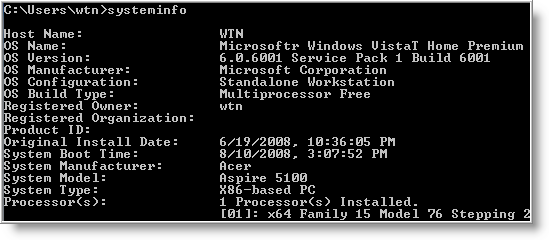
1 - systeminfo - Have a need to display operating system configuration information for a local or remote machine, including service pack levels? Then systeminfo is the tool to use. When I need to connect to a system that I am not familiar with, this is the first tool I run. The output of this command gives me all the info I need including: host name, OS type, version, product ID, install date, boot time and hardware info (processor and memory). Also knowing what hot fixes are installed can be a big help when troubleshooting problems. This tool can be used to connect to a machine remotely using the following syntax: SYSTEMINFO /S system /U user

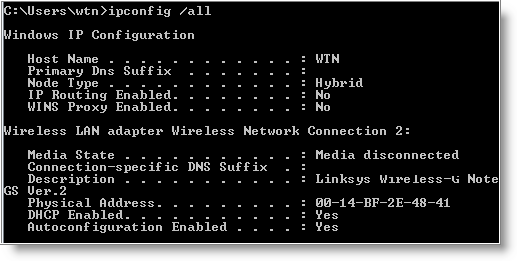
2 - ipconfig - This tool may be most useful tool for viewing and troubleshooting TCP/IP problems. It's capability includes release or renew an adapter IP Address, display and flush DNS cache, re-register the system name in DNS. WIth Vista and some server versions, ipconfig includes support for IPv6.

Some examples when usinging ipconfig.

  • To view all TCP/IP information, use: ipconfig /all
  • To view the local DNS cache, use: ipconfig /displaydns
  • To delete the contents in the local DNS cache, use: ipconfig /flushdns

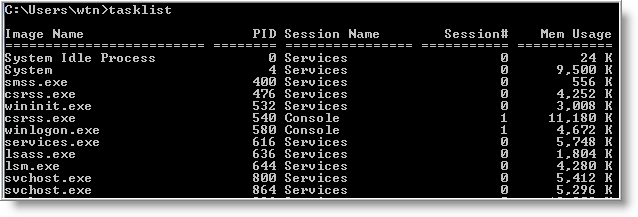
3 - tasklist and taskkill - If you are used to Windows Task Manager, then you'll find tasklist very easy to use. This tool displays a list of currently running processes, including image name, PID (Process ID) and memory usage on local or remote machines. Using the /V switch displays more information in verbose mode that includes, CPU Time, user name, and modules. Tasklist includes a filter option to display a set of task based on the criteria specified. But the best use of the filter is using it to display programs running inside svchost.exe process.

Of course, there will be times when a process needs to be killed and taskkill can be used to terminate those trouble processes. A single or multiple processes can be killed using the PID (/PID ) or image name (/IM ). Here are two examples for doing just that:

TASKKILL /IM notepad.exe
TASKKILL /PID 1230 /PID 1241 /PID 1253 /T

Both tasklist and taskkill can connect to remote systems using the /S (system name) /U (user name) switches.

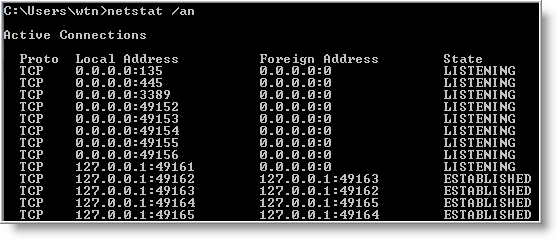
4 - netstat - Need to know who (or what) is making a connection to your computer? Then netstat is the tool you want to run. The output provides valuable information of all connections and listening ports, including the executable used in the connections. In additon to the above info, you can view Ethernet statistics, and resolve connecting host IP Addresses to a fully qualified domain name. I usually run the netstat command using the -a (displays all connection info), -n (sorts in numerical form) and -b (displays executable name) switches.

5 - type - A lesser known tool to those who don't work with the command prompt. For Administrators, the type command is the perfect tool for viewing text files. But what many people don't know about the type tool, is it's capability to read multiple files at once. For example to view multiple text files, just separate each file with a space:

type firstfile.txt secondfile.txt thirdfile.txt

For files that are large, you can control text scrolling using the more command.

6 - net command - Although this tool is more known as a command, the net command is really like a power drill with different bits and is used to update, fix, or view the network or network settings.

It is mostly used for viewing (only services that are started), stopping and starting services:

    • net stop server
    • net start server
    • net start (display running services)

and for connecting (mapping) and disconnecting with shared network drives:

    • net use m: \\myserver\sharename
    • net use m: \\myserver\sharename /delete

Other commands used with net command are, accounts (manage user accounts), net print (manage print jobs), and net share (manage shares).

Below are all the options that can be used with the net command.

[ ACCOUNTS | COMPUTER | CONFIG | CONTINUE | FILE | GROUP | HELP |HELPMSG | LOCALGROUP | PAUSE | PRINT | SESSION | SHARE | START |STATISTICS | STOP | TIME | USE | USER | VIEW ]

To display the complete syntax for each command, just type net help followed by the command - net help use .

7 - nslookup - With the Internet, DNS (Domain Name Service) is the key for allowing us to use friendly names when surfing the web instead of needing to remember IP Addresses. But when there are problems, nslookup can be a valuable tool for testing and troubleshooting DNS servers.

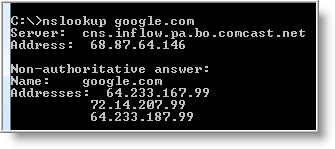
Nslookup can be run in two modes: interactive and noninteractive. Noninteractive mode is useful when only a single piece of data needs to be returned. For example, to resolve google.com:

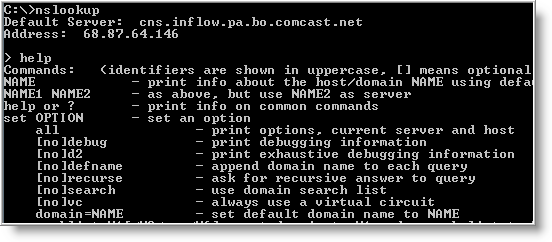
To use the interactive mode, just type nslookup at the prompt. To see all available options, type help while in interactive mode.

Don't let the help results intimidate you. Nslookup is easy to use. Some of the options I use when troubleshooting are:

set ds (displays detailed debugging information of behind the scenes communication when resolving an host or IP Address).

set domain (sets the default domain to use when resolving, so you don't need to type the fully qualified name each time).

set type (sets the query record type that will be returned, such as A, MX, NS)

server NAME (allows you to point nslookup to use other DNS servers than what is configured on your computer)

To exit out of interactive mode, type exit .

8 - ping and tracert - These tools can be helpful with connectivity to other systems. Ping will test whether a particular host is reachable across an IP network, while tracert (traceroute) is used to determine the route taken by packets across an IP network.

To ping a system just type at the prompt: ping www.google.com. By default, ping will send three ICMP request to the host and listen for ICMP “echo response” replies. Ping also includes switches to control the number of echo requests to send (-n ), and to resolve IP addresses to hostname (-a ).

To use tracert, type at the prompt: tracert www.google.com. You can force tracert to not resolve address to hostnames by using the -d switch, or set the desired timeout (milliseconds) for each reply using -w switch.

9 - gpresult - Used mostly in environments that implement group poicies, gpresults (Group Policy Results) verifies all policy settings in effect for a specific user or computer. The command is simple to use, just enter gpresults at the prompt. It can also be used to connect to computers remotely using the /S and /U switches.

10 - netsh - Without a doubt the most powerful command line tool available in Windows. Netsh is like the swiss army knife for configuring and monitoring Windows computers from the command prompt. It capabilities include:

  • Configure interfaces
  • Configure routing protocols
  • Configure filters
  • Configure routes
  • Configure remote access behavior for Windows-based remote access routers that are running the Routing and Remote Access Server (RRAS) Service
  • Display the configuration of a currently running router on any computer

Some examples of what you can do with netsh:

  • Enable or disable Windows firewall:

netsh firewall set opmode disable

netsh firewall set opmode disable

  • Enable or disable ICMP Echo Request (for pinging) in Windows firewall:

netsh firewall set icmpsetting 8 enable

netsh firewall set icmpsetting 8 disable

  • Configure your NIC to automatically obtain an IP address from a DHCP server:

netsh interface ip set address "Local Area Connection" dhcp

(For the above command, if your NIC is named something else, use netsh interface ip show config and replace the name at Local Area Connection).

As you can see netsh can do alot. Instead of re-inventing the wheel, check out the following Microsoft article for more info on netsh.

The use of Windows command line tools can be a powerful alternative when only a command prompt is available. I'm sure there are plenty more commands that I have not mention.

Let us know what your favorite command line tool is and leave a comment below.

COURTESY - www.watchingthenet.com

Posted by
Jaswinder Kaur

More

Top 10 open source Windows apps

Top 10 open source Windows apps

Geek to Live: Top 10 open source Windows apps

Companies like Google and Microsoft give away free software as a courtesy to their users to hook more people on their services ("free as in beer.") But open source organizations are often non-profit and made up of volunteer developers who release free software because they believe users have a right to control their data ("free as in speech.")

Open source roots are in the Unix operating system, but these days many "free as in speech" applications are available for Windows as well - and today I've got a list of my top 10 favorites.

None of these cost a dime to download and use, but do donate whatever and whenever you can to the projects that benefit you the most.

1. Mozilla Firefox (Web browser)

Crikey, another Firefox plug! Yeah, we love the 'fox, and we'll keep talking about it until EVERY SINGLE ONE OF YOU USES IT. It really just doesn't get any better when it comes to a cross-platform, open source web browser.

2. Mozilla Thunderbird (Email client)

Firefox's much less celebrated little brother is one helluva email client. We especially like its customizable message filters, built-in adaptive Junk mail filter and ability to install useful add-ons (like Firefox).

3. Open Office (Office suite)

Used to be that anyone who wanted to open a Word document had to drop a few Benjamins on Microsoft Office or risk pirating it. No more - Open Office is a free alternative to M$ Office for students, freelancers and poor people just wanting to save their spreadsheet as an .xls.

4. Gaim (Instant messenger)

Chat on any service you'd like - AIM, Yahoo! Messenger, MSN, Jabber, ICQ - with this multi-platform, tabbed IM client.

5. ClamWin (Antivirus)

Norton bugging you again to break out the credit card and subscribe? Uninstall! ClamWin is free anti-virus software with automatic updates and scheduled scans, no credit card required.

6. VLC Media Player (Audio/video player)

Got a video or audio file Windows Media Player or Quicktime can't play? Betcha VLC can.

7. KeePass (Password manager)

Another app you really don't hear a lot about, but for anyone with more than 6 different passwords, KeePass is indispensable. Check out my previous feature, Securely track your passwords for more on using KeePass.

8. Cygwin (Unix command line emulator)

That DOS command line just doesn't cut it. Wanna turn into a CLI ninja on your PC? You need Cygwin.

9. Eraser (Data deletion utility)

Before you donate, sell or trash your hard drive, you want to make sure there are no traces of your naughty private data on it. Eraser uses the same algorithm the government uses to wipe your hard drive clean.

10. TrueCrypt (File encryption utility)

You've got a folder full of files you don't want anyone to access but you. Lock it (or an entire thumb drive) up with the free TrueCrypt software.

Author - Gina Trapani

Courtesy - LIFEHACKER

Posted by
Jaswinder Kaur

More
Powered by Blogger.

Copyright © / Jaswinder Kaur

Template by : Urang-kurai / powered by :blogger